How do I change which number my iPhone uses for cellular data?
Only one number can use cellular data at a time on your iPhone's Dual SIM. Here's how to change it or let your iPhone switch automatically.
To change your data line manually:
- Open Settings
- Tap Mobile / Cellular Data
- Tap Cellular Data
- Select the number you want to use for data
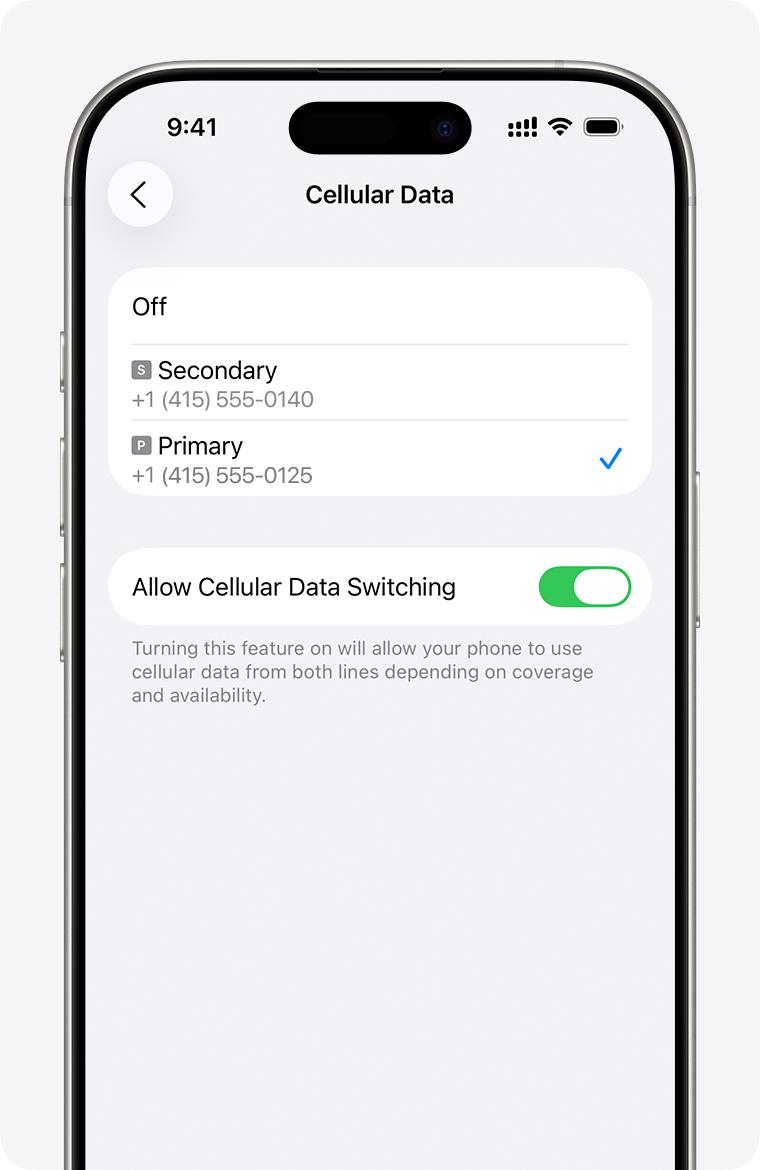
To let your iPhone switch automatically:
- Open Settings
- Tap Mobile / Cellular Data
- Tap Mobile Data
- Turn on Allow Mobile Data Switching
With this on, if you're on a voice call using your non-data number, that line automatically switches to handle data too - so you can use data during the call. With this off, cellular data won't work while you're on a call using your non-data line.
Important: if you're using an eSIM for travel data, make sure Data Roaming is enabled on that line, or it won't connect. See our eSIM install guide for iPhone for the Data Roaming step.
If mobile data still doesn't connect after checking your data line, see What is "PDP Authentication Failure"?
Related Article: Can I use my eSIM for a personal hotspot or tethering?
